Switching between frontend and backend to edit a single content element can disrupt the editorial workflow. Over the past weeks, I’ve been working on the extension that bridges this gap by adding edit buttons directly to the frontend – and I’m excited to announce version 2.0.
What is Frontend Edit?
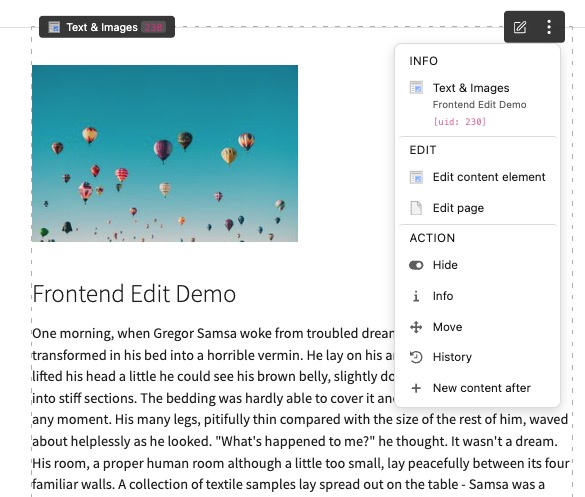
The xima_typo3_frontend_edit extension injects a lightweight JavaScript into the frontend that displays edit menus for all editable content elements. These menus are only visible to logged-in backend users and provide direct links to the corresponding backend editing forms.
Delineation from Other Solutions
There are several approaches to frontend editing in TYPO3. Here’s how this extension differs:
- frontend_editing: The “original” frontend editing extension aimed for inline editing directly in the frontend. xima_typo3_frontend_edit takes a different approach – it doesn’t modify content inline but provides quick access to the native backend forms.
- feedit : The classic TYPO3 frontend editing solution. My extension shares some conceptual similarities but is an independent, modern implementation using current TYPO3 APIs (PSR-15 middleware, dependency injection, Site Settings).
- content_preview: Provides a split-view with live frontend preview within the backend Page module. In contrast, xima_typo3_frontend_edit works directly in the frontend and doesn’t modify the backend interface at all.
The goal was to create a simple, lightweight solution that reduces the gap between frontend and backend without the complexity of inline editing or backend modifications.
Features
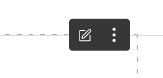
Edit Menu – Hover over any content element to reveal an edit button:
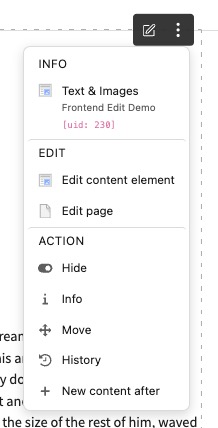
Clicking opens a dropdown with various actions:
- Edit – Open the content element in the backend editor
- Edit page – Open page properties
- Hide/Unhide – Toggle visibility
- Info – Display element information
- Move – Reorder content elements
- History – View revision history
- New content after – Add new elements
Sticky Toolbar – A configurable toolbar provides page-level actions:

- Toggle frontend editing on/off (persisted via AJAX)
- Edit page properties
- Open Page module
- Page info and move actions

Additional Features:
- Data ViewHelper – Add edit links for related records (e.g., news items, custom records)
- Dark/Light Mode – Automatic detection or manual selection
- 12 Toolbar Positions – Place it wherever fits your design
- Save & Close Button – Quick return to frontend after editing
- Content Element Overlay – Visual highlighting on hover
What’s New in Version 2.0
This is a major release with significant improvements:
New Features:
- Sticky Toolbar with Toggle – Enable/disable frontend editing per session, state persisted via AJAX
- Page-level Dropdown Menu – New edit options for pages
- Better Overlay System – Content elements are highlighted when hovering
- Dynamic Dropdown Positioning – Using Floating UI for smart placement
- Scroll-to-Element – Page Layout module automatically scrolls to the edited element
- New PSR-14 Event – FrontendEditPageDropdownModifyEvent for toolbar customization
- Data Attributes – Content element UID and CType exposed for custom integrations
- Theming Support – Styling options and custom CSS variables
Breaking Changes:
- TYPO3 13.4+ required (v11 and v12 dropped)
- PHP 8.2+ required (8.1 dropped, 8.5 added)
- Site Settings configuration – TypoScript configuration removed, now configured via YAML
- MenuGenerator refactored – Split into ContentElementMenuGenerator and PageMenuGenerator
Links
- TER: Making sure you're not a bot!
- Packagist: xima/xima-typo3-frontend-edit - Packagist.org
- GitHub: GitHub - xima-media/xima-typo3-frontend-edit: ✏️ TYPO3 extension which provides an edit menu for editors within the frontend regarding content elements and pages.
- Documentation: Frontend Edit — Frontend Edit main documentation
- Release Notes 2.0: Release 2.0.0 · xima-media/xima-typo3-frontend-edit · GitHub
I’d love to hear your feedback!
Are you using similar solutions for frontend editing? What features would improve your editorial workflow? Any suggestions for future development are welcome.